Skip to content
  • Home
  • Pricing
  • Support
  • Download
  • My account
auto rigger
  • Home
  • Pricing
  • Support
    • Documentation
    • Tutorials
    • Create A Ticket
    • Contact Us
    • Changelog
  • Download
MY ACCOUNT
auto rigger

Setup Arise

6
  • Introduction
  • System Requirements
  • Create Account / Login
  • Installation
  • License Activation Instructions
  • Troubleshooting

Getting Started Tutorial

8
  • Interfaces (UI)
  • How To Prepare The Model For Rigging?
  • What Are Nodes, Attachments, and Presets?
  • What Are Guides?
  • What is The Attribute Editor?
  • Let’s Start Rigging
  • How To Export Rigs?
  • Digging Deeper

Elements

29
  • Node
  • Attachment
  • Presets
  • Attribute Editor And Attributes Types
  • Workspace
  • Outliner
  • Guides
  • Connections
  • Loading/Saving
  • Placeholders
  • Dump_grp
  • Skinning Joints
  • Poses
  • Group Node
  • Rig Base Node
  • Helper Tools
  • Preferences
  • Scene Settings
  • Log Viewer
  • Model Validation Checks
  • Model Updater
  • AI Auto Guides Placement
  • Rig Mocap Tester
  • Rig Export
  • Batch Menu
  • Sticky Note
  • API Commands
  • Custom Ctrls Shapes
  • Ctrl Shapes Lookup

How To Create Your Own Node

6
  • The Basics On How To Create Your Own Node
  • Creating Attributes
  • Creating Guides
  • IoJoint
  • IoTransform
  • Example Node Module

How To Create Your Own Attachment

1
  • Creating Custom Attachments in Arise

Basic Nodes

8
  • Base Node
  • One Joint
  • FK Chain
  • IK Chain
  • Two Joints IK
  • Dynamic FK Chain
  • Eye
  • Path

CA Nodes

12
  • CA_Spine
  • CA Head
  • CA Leg
  • CA Arm
  • CA Fingers
  • CA_Mouth
  • CA Eye
  • CA Quadruped Back Leg
  • CA Quadruped Front Leg
  • CA Ribbon
  • CA Tentacle
  • CA Wing

Attachments

22
  • SpaceSwitch
  • CtrlsShape
  • CtrlsSettings
  • MakeDynamic
  • FollowSkeleton
  • PostScript
  • MovablePivot
  • HelperJoints
  • Rename
  • AttributesSettings
  • CustomDriver
  • CustomDriven
  • ManualConnections
  • AddJoints
  • AddGroupAbove
  • JointsSettings
  • Parent
  • AddAttribute
  • ConnnectAttribute
  • HumanIK
  • CtrlsLockHideAttributes
  • CtrlsLimitAttributes

Mechanical

2
  • Vehicle Body
  • Wheel
View Categories
  • Home
  • Arise Docs
  • Setup Arise
  • Troubleshooting

Troubleshooting

Arise Troubleshooting

Maya crashes when lunching Arise.
It has been discovered that Arise, along with other software such as Mari and Nuke, may sometimes fail to launch on machines using Intel 10th Gen (Ice Lake), 11th Gen (Rocket Lake), or 12th Gen (Alder Lake) CPUs. This issue only affects Windows operating systems.

To fix this bug, follow these steps:

  1. Open Control Panel.
  2. Go to System > Advanced System Settings > Environment Variables.
  3. In the ‘User Variables for User’ section, click ‘Add’.
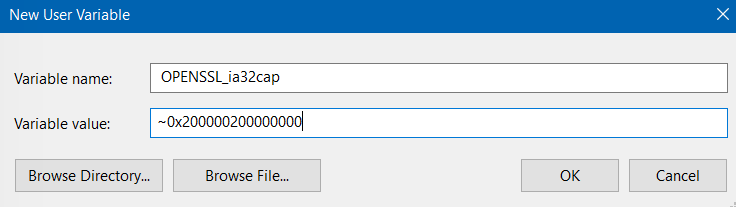
  4. Enter the following values:
    Variable Name: OPENSSL_ia32cap
    Variable Value: ~0x200000200000000
  5. Restart your machine.

For more details, refer to the [fix explanation link].
License Troubleshooting
You can use this section to debug any license issues you might encounter. In the event you cannot resolve an issue after reading the Activation Instructions and this document, please create a ticket so we can assist you.

If something goes wrong during activation, look for feedback in three places:

  • Maya’s Script Editor window.
  • Arise log Viewer.
  • And the feedback line at the bottom of the ‘Activate License’ window (menu bar ‘Help’ -> ‘Activate License’).
Script Editor | Log Viewer
Cannot reach the license server. check your internet connection.
It’s probably because the internet isn’t working.
Ensure your internet is working, and that no firewall rules are blocking Maya from accessing the internet. 

Script Editor | Log Viewer
#### Error running license. If you own a license check our online documentation or contact us.
The message is a general error message. Please create a support ticket if your internet connection is working, there are no firewall rules blocking Maya, and you have entered the correct API Key and License Type.

‘Activate License’ feedback line
No internet connection. Cannot activate / deactivate / check license.
There may be no internet connection, as stated in the feedback. 
Ensure your internet is working and that no firewall rules are blocking Maya from accessing the internet.

‘Activate License’ feedback line 
Invalid API Key! Please input your API Key, which you can find on your account page online.
The API Key field is probably empty or contains illegal characters.
Your API Key can be found under the API Key tab on your account page.

‘Activate License’ feedback line
No API resources exist. Login to My Account to verify there are activations remaining, and the API Key and Product ID are correct.
The ‘API Key’ or ‘License Type’ might be incorrect, or you do not have any more activations available.
You can check how many activations you have left in your account under ‘API Keys’ and, if necessary, deactivate a license. [deactivation instructions] 

‘Activate License’ feedback line
Cannot activate API Key. No API resources are available.
It appears that you have used up all your activations. 
Deactivate a license from your ‘API Keys‘ tab. [deactivation instructions]

‘Activate License’ feedback line
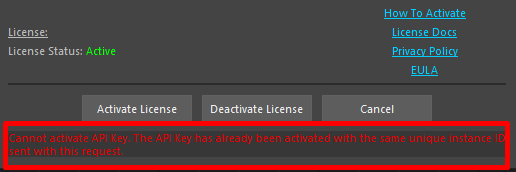
Cannot activate API Key. The API Key has already been activated with the same unique instance ID sent with this request.
There is no need to reactivate the license, as it is already active. The license status should be green.

‘Activate License’ feedback line
A customer account does not exist for this API Key.
The API Key or the License Type is incorrect.

‘Activate License’ feedback line
The API Key could not be deactivated.
If you try to deactivate an API Key that isn’t active on that machine, this error will occur.
Licenses can easily be deactivated from ‘My Account’ under the ‘API Keys‘ tab. [deactivation instructions]

_____________________________________________
Get Arise at: https://www.ariserigging.com
Follow on LinkedIn

Updated on May 13, 2026

What are your Feelings

Share This Article :

  • Facebook
  • X
  • LinkedIn
  • Pinterest
License Activation InstructionsIntroduction
  • Home
  • Pricing
  • Support
  • My account
  • Privacy Policy
  • EULA

Copyright © 2026 - Arise Rigging System

This website uses cookies to ensure you get the best experience. By using this site, you agree to our use of cookies.
Accept
Manage consent

Privacy Overview

This website uses cookies to improve your experience while you navigate through the website. Out of these, the cookies that are categorized as necessary are stored on your browser as they are essential for the working of basic functionalities of the website. We also use third-party cookies that help us analyze and understand how you use this website. These cookies will be stored in your browser only with your consent. You also have the option to opt-out of these cookies. But opting out of some of these cookies may affect your browsing experience.
Necessary
Always Enabled
Necessary cookies are absolutely essential for the website to function properly. These cookies ensure basic functionalities and security features of the website, anonymously.
CookieDurationDescription
cookielawinfo-checkbox-analytics11 monthsThis cookie is set by GDPR Cookie Consent plugin. The cookie is used to store the user consent for the cookies in the category "Analytics".
cookielawinfo-checkbox-functional11 monthsThe cookie is set by GDPR cookie consent to record the user consent for the cookies in the category "Functional".
cookielawinfo-checkbox-necessary11 monthsThis cookie is set by GDPR Cookie Consent plugin. The cookies is used to store the user consent for the cookies in the category "Necessary".
cookielawinfo-checkbox-others11 monthsThis cookie is set by GDPR Cookie Consent plugin. The cookie is used to store the user consent for the cookies in the category "Other.
cookielawinfo-checkbox-performance11 monthsThis cookie is set by GDPR Cookie Consent plugin. The cookie is used to store the user consent for the cookies in the category "Performance".
viewed_cookie_policy11 monthsThe cookie is set by the GDPR Cookie Consent plugin and is used to store whether or not user has consented to the use of cookies. It does not store any personal data.
Functional
Functional cookies help to perform certain functionalities like sharing the content of the website on social media platforms, collect feedbacks, and other third-party features.
Performance
Performance cookies are used to understand and analyze the key performance indexes of the website which helps in delivering a better user experience for the visitors.
Analytics
Analytical cookies are used to understand how visitors interact with the website. These cookies help provide information on metrics the number of visitors, bounce rate, traffic source, etc.
Advertisement
Advertisement cookies are used to provide visitors with relevant ads and marketing campaigns. These cookies track visitors across websites and collect information to provide customized ads.
Others
Other uncategorized cookies are those that are being analyzed and have not been classified into a category as yet.
SAVE & ACCEPT