

Creates a cartoon spine with IK/FK, bendy bones, Bezier ctrls, manual/auto volume, moveable pivots, and more.
Guides:
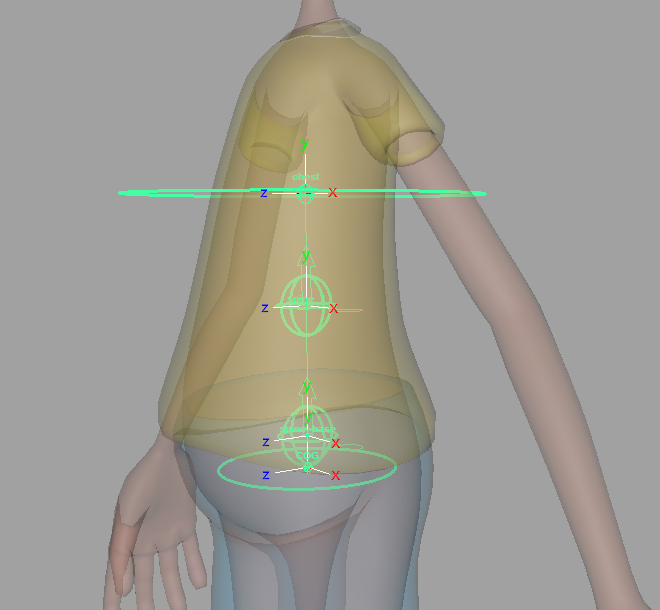
- ‘COG’ – Position at the center of gravity, around the pelvis area.
- ‘Base’ – Position at the base of the spine, slightly above the pelvis.
- ‘Spine_#’ – Position these guides along the spine, up until below the rib-cage. The number of these guides is determined by the attribute ‘IK FK Ctrls Count’.
- ‘Chest’ – Position at the bottom of the rib-cage.
Attributes:
- ‘Single Side Guide’ – For some Aim Guides, the ‘side_vector’ (twist) is locked and driven by a single ‘side_vector’, which keeps the orientation consistent. Uncheck this attribute to unlock them if you need more control over the twist. Re-template is required when changes are made. [Video]
- ‘Ctrls Scale’ – Scale all the node ctrls. Note that the attachments ‘Ctrls Settings’ and ‘CtrlsShape’ will override this.
[As of version 1.06.03] ‘Update’ button to change the ctrls size without requiring a rebuild. [Video] - ‘Clean Transformations’ – If checked, the zeroed pose will be the same as the bind pose; if unchecked, when zeroing the ctrls, they will align with a world axis specified in the following two attributes. [Video]
- ‘World Orientation’ – The world axis the ctrls will align with when zeroed. Usually, this attribute’s default value is the correct value. [Video]
- ‘World Orient Twist’ – Along with ‘World Orientation’, defines the ctrls zeroed pose. Usually, the default value of 0 is the correct value. [Video]
- ‘Expose RotateOrder’ – Exposes all the ctrls ‘RotateOrder’ attribute in the Channel Box. [Video]
- ‘Secondary Ctrls’ – Secondary ctrls are added under some ctrls to help prevent gimbal lock.
A visibility attribute is added to the parent ctrl. [Video] - ‘Volume’ – Adds ‘Auto Volume’ and ‘Manual Volume’ attributes.
- ‘Movable Pivots’ – Adds a movable pivot to ‘cog_ctrl’ and ‘pelvis_ctrl’, similar to the attachment ‘MovablePivot’.
- ‘IK Ctrls Follow’ – IK ctrls will aim at their next ctrl and move with ‘base_ctrl’ and ‘chest_ctrl’.
- ‘IK FK Ctrls Count’ – The number of middle ctrls between ‘base_ctrl’ and ‘chest_ctrl’ for both IK and FK.
- ‘Ribbon Joints’ – The number of skinning joints the spine has besides the ‘pelvis_jnt’ and ‘chest_jnt’. [Video]
- ‘Ribbon Micro Ctrls’ – Create a ctrl for every ribbon skinning joint. [Video]
- ‘Bezier Ctrls’ – Add ctrls that deform the ribbon like a Bezier curve. [Video]
- ‘Bezier Ctrls Offset’ – Position offset of the Bezier ctrls from the joint chain.
Connections:
- ‘Root Input’ – Drives the whole node.
- ‘Root Output’ – An output at the pelvis joint.
- ‘Tip Output’ – An output at the chest joint.
_____________________________________________
Get Arise at: https://www.ariserigging.com


