

Creates the front leg of a 4-legged animal (quadruped). Features include IK/FK, ribbon, twist, soft IK, stretch, pin ctrl, master ctrletc.
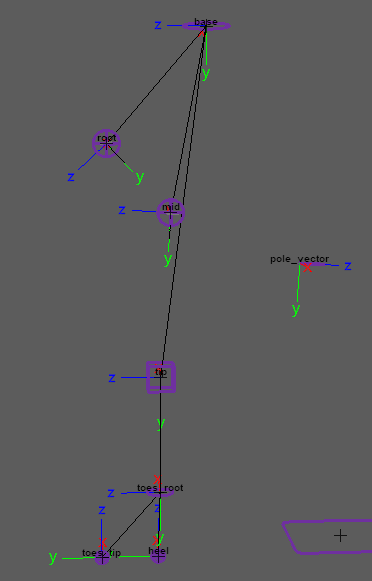
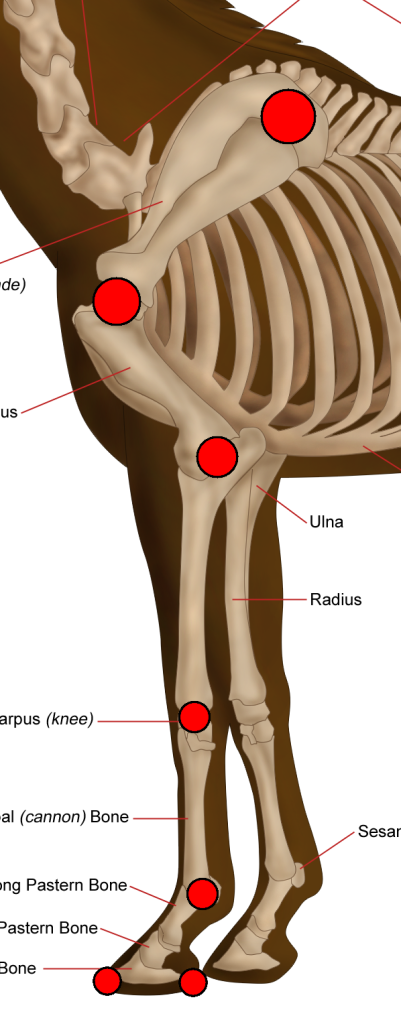
Guides:
Attributes:
- ‘Ctrls Scale’ – Scale all the node ctrls. Note that the attachments ‘Ctrls Settings’ and ‘CtrlsShape’ will override this.
[As of version 1.06.03] ‘Update’ button to change the ctrls size without requiring a rebuild. [Video] - ‘Clean Transformations’ – If checked, the zeroed pose will be the same as the bind pose; if unchecked, when zeroing the ctrls, they will align with a world axis specified in the following two attributes. [Video]
- ‘World Orientation’ – The world axis the ctrls will align with when zeroed. Usually, this attribute’s default value is the correct value. [Video]
- ‘World Orient Twist’ – Along with ‘World Orientation’, defines the ctrls zeroed pose. Usually, the default value of 0 is the correct value. [Video]
- ‘Expose RotateOrder’ – Exposes all the ctrls ‘RotateOrder’ attribute in the Channel Box. [Video]
- ‘Secondary Ctrls’ – Secondary ctrls are added under some ctrls to help prevent gimbal lock.
A visibility attribute is added to the parent ctrl. [Video] - ‘Ik Fk Switch’ – Select where the ‘Ik Fk Switch’ attribute and other shared attributes are placed: [Video]
- ‘switch_ctrl’ – Places them on a ctrl that follows the leg tip (default).
- ‘proxy_attrs’ – places them as shared attributes (proxy attributes), on both the IK tip ctrl and the FK tip ctrl.
- ‘Switch Ctrl Offset’ – Position offset of ‘switch_ctrl’ from the ‘tip_jnt’.
- ‘Volume’ – Adds ‘Auto Volume’ and ‘Manual Volume’ attributes.
- ‘Pin Ctrl’ – Add a ‘pin_ctrl’ that constrains ‘mid_ctrl’ when activated. To activate this ctrl use the ‘Pin’ attribute on ‘mid_ctrl’.
Use a ‘SpaceSwitch’ attachment for ‘pin_ctrl’ to properly use this feature. - ‘Mirror Behaviour’ – Only affects mirrored nodes.
- Unchecked – The IK ctrls of mirrored nodes will align with the world, meaning that both legs will move and rotate in the same direction (default for legs).
- Checked – The IK ctrls of mirrored nodes will mirror orientations, meaning that both legs will reflect each other (default for arms).
- ‘IK Twist’ – The attribute ‘Twist’ is added to ‘ik_tip_ctrl’, giving you another control over the IK chain twist.
- ‘Stretch’ – The attributes ‘Auto Stretch’ and ‘Manual Stretch’ are added to ‘ik_tip_ctrl’ for control over the leg length.
- ‘Toggle Pole Vector’ – The attribute ‘Toggle Pole Vector’ is added to ‘ik_tip_ctrl’, which can turn off the pole vector constraint.
- ‘Soft IK’ – The attribute ‘Soft Ik’ is added to ‘ik_tip_ctrl’, which helps fix the ‘pop’ in the animation when the IK chain gets fully extended.
- ‘Auto Clavicle’ – (As of version 1.05.00) Enables automatic rotation of ‘base_jnt’ based on ‘ik_tip_ctrl’ movement.
Add attributes ‘Auto Base X Mult‘ and ‘Auto Base Z Mult‘ to the ‘ik_tip_ctrl’.
Values of 0.2-0.4 are recommended for those attributes. - ‘Ctrls Translate’ – If checked, animators will also be able to translate the FK ctrls.
- ‘Ribbon Joints’ – How many skinning joints each ribbon will have (total x2; upper ribbon and lower ribbon). [Video]
- ‘Ribbon Twist’ – Allow the ribbon joints to twist. Turn this off for creatures with external skeletons, such as spiders, or for characters wearing rigid armor.
- ‘Ribbon Micro Ctrls’ – Add a ctrl for every ribbon skinning joint. [Video]
- ‘Bezier Ctrls’ – Adds ctrls that deform the ribbon like a Bezier curve. [Video]
- ‘Bezier Ctrls Offset’ – Position offset of the Bezier ctrls from the joint chain.
Connections:
- ‘Root Input’ – Drives the ctrls of this node except the ‘ik_tip_ctrl’ and the ‘ik_pv_ctrl’. Usually driven by the spine node.
- ‘IK Tip Input’ – Drives the ‘ik_tip_ctrl’ and the ‘ik_pv_ctrl’. Separate from ‘Root Input’ because we often want the IK ctrls to move with the ‘Base’ node.
- ‘Root Output’ – An output at the ‘root_jnt’ (pelvis).
- ‘Ankle Output’ – An output at the ‘tip_jnt’.
- ‘Toes Tip Output’ – An output at the ‘toes_tip_root_jnt’.
_____________________________________________
Get Arise at: https://www.ariserigging.com


