Skip to content
  • Home
  • Pricing
  • Support
  • Download
  • My account
auto rigger
  • Home
  • Pricing
  • Support
    • Documentation
    • Documentation 2
    • Tutorials
    • Create A Ticket
    • Contact Us
    • Changelog
  • Download
MY ACCOUNT
auto rigger

Setup Arise

3
  • Installation
  • System Requirements
  • Create Account / Login
View Categories
  • Home
  • Arise Docs
  • Setup Arise
  • Installation

Installation

1 min read

  1. Log in first to access the download page for ARISE.
  2. Download the Arise Rigging System installation package (rar file).
  3. Once downloaded, unpack the ‘arise_main’ folder from the rar file. We recommend unpacking it in Maya’s script folder, which should be in: ‘C:\Users\<USER>\Documents\maya\scripts\’ (replace <USER> with your own folder name).
  4. Now you can choose between the 2 methods below to create your Arise shelf inside Maya:

Automatic Install (Recommended):

  1. Inside the ‘arise_main’ folder there will be a file named ‘install.py’, drag and drop this file into an open Maya scene and a window will pop open.
  2. Click ‘Find Folder’ and navigate to the ‘arise_main’ folder you unpacked and then press ‘Create Shelf Buttons’.
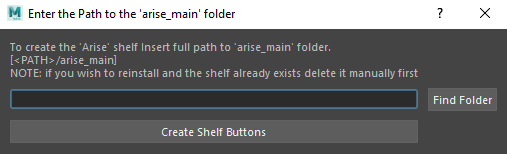
  3. This will create a new Maya Shelf called ‘Arise’. Click on the first ‘Arise’ shelf button to launch Arise. 

Manual Install:

To start Arise manually or to create your own shelf button, use the following Python code.

Make sure you modify the LOCAL_PATH to reflect where the ‘arise_main’ folder is on your computer (use forward slashes ‘/’).

import sys
import os

LOCAL_PATH = "<arise_main_folder_path>" # e.g. "C:/Users/Documents/maya/scripts/arise_main"

version_folder = "py_{0}_{1}".format(sys.version_info.major, sys.version_info.minor)
path = os.path.join(LOCAL_PATH, version_folder)

if path not in sys.path:
    sys.path.append(path)

from arise.ui_elements import ior_main_window

# load UI.
try:
    Win.deleteLater()
    print("deleting old UI")
except:
    pass

Win = ior_main_window.IORMainWindow(
    parent_to_maya=None, # can be (True, False, None)
    always_on_top=None, # can be (True, False, None)
    log_feedback_level="info",
    default_settings=False,
)

Win.show_()

Use the following Python code to manually run the ‘Model Validation Checks’ tool.

Be sure to modify the LOCAL_PATH so that it points to the ‘arise_main’ folder on your computer (use forward slashes ‘/’).

import sys
import os

LOCAL_PATH = "<arise_main_folder_path>"  # e.g. "C:/Users/Documents/maya/scripts/arise_main"

version_folder = "py_{0}_{1}".format(sys.version_info.major, sys.version_info.minor)
path = os.path.join(LOCAL_PATH, version_folder)

if path not in sys.path:
    sys.path.append(path)

from arise.model_updater.model_validation.ui import validation_main_window

# load UI.
try:
    validation_ui.deleteLater()
except:
    pass

validation_ui = validation_main_window.ValidationMainWindow()

_____________________________________________

Get Arise at: https://www.ariserigging.com

Follow on LinkedIn

Updated on May 2, 2026

What are your Feelings

Share This Article :

  • Facebook
  • X
  • LinkedIn
  • Pinterest
Create Account / LoginSystem Requirements
  • Home
  • Pricing
  • Support
  • My account
  • Privacy Policy
  • EULA

Copyright © 2026 - Arise Rigging System

This website uses cookies to ensure you get the best experience. By using this site, you agree to our use of cookies.
Accept
Manage consent

Privacy Overview

This website uses cookies to improve your experience while you navigate through the website. Out of these, the cookies that are categorized as necessary are stored on your browser as they are essential for the working of basic functionalities of the website. We also use third-party cookies that help us analyze and understand how you use this website. These cookies will be stored in your browser only with your consent. You also have the option to opt-out of these cookies. But opting out of some of these cookies may affect your browsing experience.
Necessary
Always Enabled
Necessary cookies are absolutely essential for the website to function properly. These cookies ensure basic functionalities and security features of the website, anonymously.
CookieDurationDescription
cookielawinfo-checkbox-analytics11 monthsThis cookie is set by GDPR Cookie Consent plugin. The cookie is used to store the user consent for the cookies in the category "Analytics".
cookielawinfo-checkbox-functional11 monthsThe cookie is set by GDPR cookie consent to record the user consent for the cookies in the category "Functional".
cookielawinfo-checkbox-necessary11 monthsThis cookie is set by GDPR Cookie Consent plugin. The cookies is used to store the user consent for the cookies in the category "Necessary".
cookielawinfo-checkbox-others11 monthsThis cookie is set by GDPR Cookie Consent plugin. The cookie is used to store the user consent for the cookies in the category "Other.
cookielawinfo-checkbox-performance11 monthsThis cookie is set by GDPR Cookie Consent plugin. The cookie is used to store the user consent for the cookies in the category "Performance".
viewed_cookie_policy11 monthsThe cookie is set by the GDPR Cookie Consent plugin and is used to store whether or not user has consented to the use of cookies. It does not store any personal data.
Functional
Functional cookies help to perform certain functionalities like sharing the content of the website on social media platforms, collect feedbacks, and other third-party features.
Performance
Performance cookies are used to understand and analyze the key performance indexes of the website which helps in delivering a better user experience for the visitors.
Analytics
Analytical cookies are used to understand how visitors interact with the website. These cookies help provide information on metrics the number of visitors, bounce rate, traffic source, etc.
Advertisement
Advertisement cookies are used to provide visitors with relevant ads and marketing campaigns. These cookies track visitors across websites and collect information to provide customized ads.
Others
Other uncategorized cookies are those that are being analyzed and have not been classified into a category as yet.
SAVE & ACCEPT