
Back to ‘Basics On How To Create Your Own Node‘
THE GUIDES_CREATION METHOD:
Within the ‘guides_creation()’ method, we define the guides for our node. Instead of directly creating the guides, we create objects that store instructions for their automatic creation when needed by Arise.
This method is also invoked and updated whenever an attribute value changes on the node, allowing us to utilize the node’s attribute values here too, such as when we want an attribute to control the number of guides.
Arise automatically creates the top parent guide for the node at the scene root.
For more information on the various guides Arise can generate, refer to [link].
Guides Creation Commands:
- self.add_guide(name, translation=None, rotation=None, parent=None)
This command creates a basic guide that users can freely translate and rotate.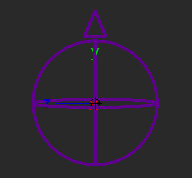
Arguments:- name {str} — The guide name. The node name prefix is automatically filled out.
- translation {list, tuple or None} — Represents XYZ translation. If None, defaults to (0, 0, 0).
- rotation {list, tuple or None} — Represents XYZ rotation. If None, defaults to (0, 0, 0).
- parent {another guide pointer or None} — Specifies the parent guide. Defaults to None for the top parent guide.
Guide Variables:
After creating the default guide, the following variables can be utilized: (example: self.my_guide.size = 5)
- name {str} — Rename the guide.
- parent {str} — Assign a new parent guide.
- translation {list, tuple or None} — Represents XYZ translation. If None, defaults to (0, 0, 0).
- visual_parent {Another Guide Pointer} — Modifies the visual connection line drawn between parent and child guides.
- shape {str} — Modify the guide’s shape using one of the string names of shapes Arise uses [Shapes Lookup]
- up_orient {str} — Orient the guide shape. Valid values: ‘+X’, ‘-X’, ‘+Y’, ‘-Y’, ‘+Z’, ‘-Z’.
- size {float} — Adjust the shape’s size.
- line_width {float} — Adjust the shape’s line width.
- rotate_offset {list, tuple or None} — Of 3 floats to rotate the guide shape. Gives better control of the shape orientations than up_orient.
- translate_offset {list, tuple or None} — Of 3 floats to offset the position of the guide shape from its pivot.
- scale_offset {list, tuple or None} — Of 3 floats to scale the guide shape non-uniformly.
- self.add_aim_guide(name, aim_at_guide=None, parent=None, translation=None, side_pin_rotation=None, side_pin_guide=None)
This command creates an aim guide that constantly aims at another guide, allowing users to control its position but not rotation.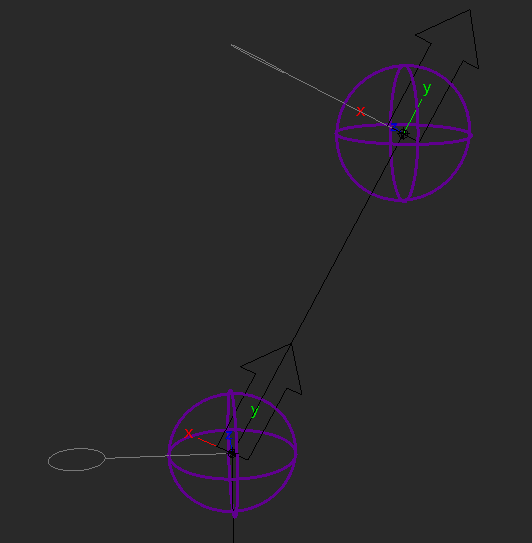
Arguments:- name {str} — The guide name. The node name prefix is automatically filled out.
- aim_at_guide {guide or None} — Specifies another guide to aim at. Defaults to None.
- parent {another guide pointer or None} — Specifies the parent guide. Defaults to None for the top parent guide.
- translation {list, tuple or None} — Represents XYZ translation. If None, defaults to (0, 0, 0).
- side_pin_rotation {list or tuple or None} –Represents XYZ rotation in world space of the up vector pin controller.
- side_pin_guide {AimGuideInfo or None} — If not None will have the provided AimGuideInfo side_pin_ctrl drive this aimGuide ‘side_pin_ctrl’.
Guide Variables:
After creating the Aim guide, the following variables can be utilized:
- aim_rotation_offset {list, tuple or None} — Represents XYZ rotation offset values of the aim guide.
- side_pin_size {float} — Size of the side pin guide.
- arrow_size {float} — Size of the of the aim guide arrow.
- name {str} — Rename the guide.
- parent {str} — Assign a new parent guide.
- translation {list, tuple or None} — Represents XYZ translation. If None, defaults to (0, 0, 0).
- visual_parent {Another Guide Pointer} — Modifies the visual connection line drawn between parent and child guides.
- shape {str} — Modify the guide’s shape using one of the string names of shapes Arise uses [Shapes Lookup].
- up_orient {str} — Orient the guide shape. Valid values: ‘+X’, ‘-X’, ‘+Y’, ‘-Y’, ‘+Z’, ‘-Z’.
- size {float} — Adjust the shape’s size.
- line_width {float} — Adjust the shape’s line width.
- rotate_offset {list, tuple or None} — Of 3 floats to rotate the guide shape. Gives better control of the shape orientations than up_orient.
- translate_offset {list, tuple or None} — Of 3 floats to offset the position of the guide shape from its pivot.
- scale_offset {list, tuple or None} — Of 3 floats to scale the guide shape non-uniformly.
- self.add_pole_vector_guide(name, guide_start, guide_mid, guide_end, offset=(0, 3))
This command creates a pole vector guide that moves along the dynamic plane defined by three guides.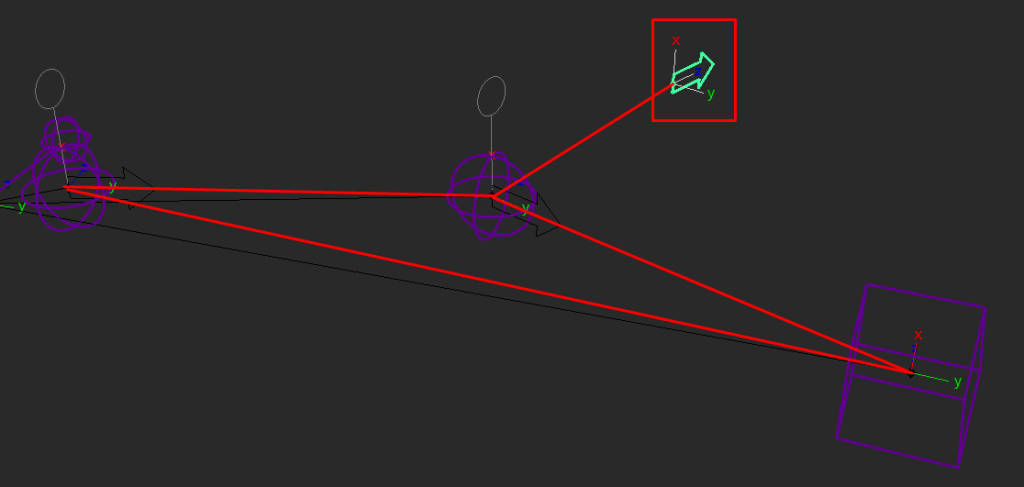
Arguments:- name {str} — The guide name. The node name prefix is automatically filled out.
- guide_start {guide info ptr} — Specifies the first guide defining the plane.
- guide_mid {guide info ptr} — Specifies the second guide defining the plane. Its position plus the offset determines the position of this guide.
- guide_end {guide info ptr} — Specifies the third guide defining the plane.
- offset {tuple} — Specifies the offset on the plane from ‘guide_mid’ position to place this guide. Defaults to (0, 3).
Guide Variables:
After creating the Pole Vector guide, the following variables can be utilized:
- name {str} — Rename the guide.
- parent {str} — Assign a new parent guide.
- translation {list, tuple or None} — Represents XYZ translation. If None, defaults to (0, 0, 0).
- visual_parent {Another Guide Pointer} — Modifies the visual connection line drawn between parent and child guides.
- shape {str} — Modify the guide’s shape using one of the string names of shapes Arise uses [Shapes Lookup].
- up_orient {str} — Orient the guide shape. Valid values: ‘+X’, ‘-X’, ‘+Y’, ‘-Y’, ‘+Z’, ‘-Z’.
- size {float} — Adjust the shape’s size.
- line_width {float} — Adjust the shape’s line width.
- rotate_offset {list, tuple or None} — Of 3 floats to rotate the guide shape. Gives better control of the shape orientations than up_orient.
- translate_offset {list, tuple or None} — Of 3 floats to offset the position of the guide shape from its pivot.
- scale_offset {list, tuple or None} — Of 3 floats to scale the guide shape non-uniformly.
- self.add_direction_guide(name, position_guide, offset=(0, 0, 0))
This command creates a guide that moves with another guide, allowing user control over orientation only.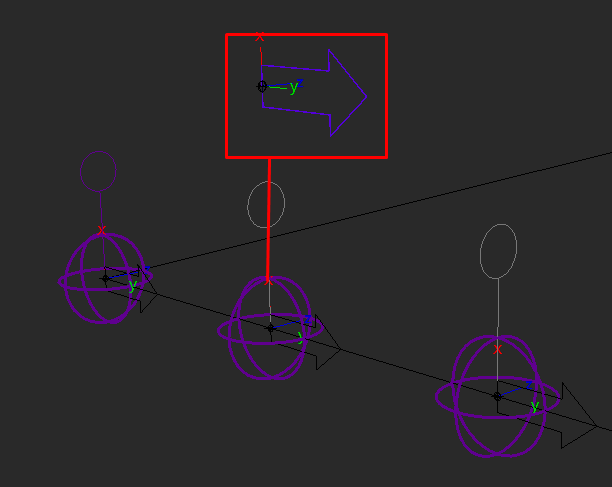
Arguments:- name {str} — The guide name. The node name prefix is automatically filled out.
- position_guide {guide pointer} — Specifies another guide that drives its position.
- offset {list, tuple} — Represents XYZ translation offset from the ‘position_guide’ position. Defaults to (0, 0, 0).
Guide Variables:
After creating the Direction guide, the following variables can be utilized:
- rotation {list or tuple or None} — Represents XYZ rotation of the direction guide.
- rotation_follow {bool} — Set to True to orient as well as move with the ‘position_guide’. Defaults to False. New in version 1.05.01.
- name {str} — Rename the guide.
- parent {str} — Assign a new parent guide.
- translation {list, tuple or None} — Represents XYZ translation. If None, defaults to (0, 0, 0).
- visual_parent {Another Guide Pointer} — Modifies the visual connection line drawn between parent and child guides.
- shape {str} — Modify the guide’s shape using one of the string names of shapes Arise uses [Shapes Lookup].
- up_orient {str} — Orient the guide shape. Valid values: ‘+X’, ‘-X’, ‘+Y’, ‘-Y’, ‘+Z’, ‘-Z’.
- size {float} — Adjust the shape’s size.
- line_width {float} — Adjust the shape’s line width.
- rotate_offset {list, tuple or None} — Of 3 floats to rotate the guide shape. Gives better control of the shape orientations than up_orient.
- translate_offset {list, tuple or None} — Of 3 floats to offset the position of the guide shape from its pivot.
- scale_offset {list, tuple or None} — Of 3 floats to scale the guide shape non-uniformly.
- self.add_multi_parents_guide(name, translation=None, rotation=None) (New in version 1.05.02)
This command creates a guide driven by multiple parents, allowing for parent, point, orient, and/or scale constraints.
To create a parent constraint: After creating your multi-parent guide, assign its ‘parent_weights‘ variable with a list of lists. Each inner list should contain a guide pointer and its corresponding weight value: [[guide, weight], …]
To create a point constraint: Do the same with the variable ‘point_weights‘.
To create an orient constrain: Do the same with the variable ‘orient_weights‘.
To create a scale constraint: Do the same with the variable ‘scale_weights‘.
It’s important to note that if you use ‘parent_weights‘, the weights specified in ‘point_weights‘ and ‘orient_weights‘ will be disregarded.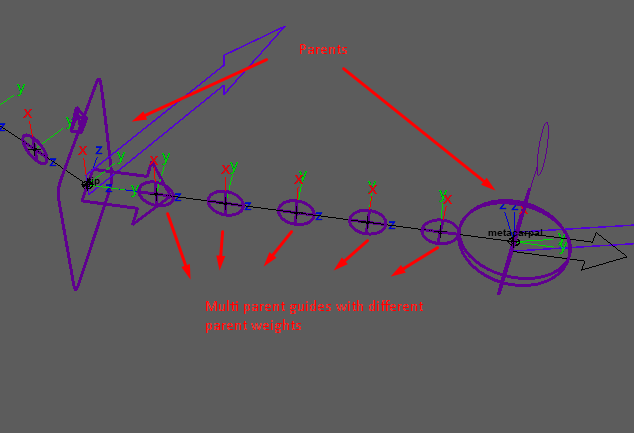
Arguments:- name {str} — The guide name. The node name prefix is automatically filled out.
- translation {list, tuple or None} — Represents XYZ translation. If None, defaults to (0, 0, 0).
- rotation {list, tuple or None} — Represents XYZ rotation. If None, defaults to (0, 0, 0).
Guide Variables:
After creating the Multi-Parents guide, the following variables can be utilized:
- parent_weights {list} — A list of lists, each inner list containing a parent guide pointer and its weight value: [[parent, weight], …]
- point_weights {list} — A list of lists, each inner list containing a parent guide pointer and its weight value: [[parent, weight], …]
- orient_weights {list} — A list of lists, each inner list containing a parent guide pointer and its weight value: [[parent, weight], …]
- scale_weights {list} — A list of lists, each inner list containing a parent guide pointer and its weight value: [[parent, weight], …]
- lock_translation {bool} — Locks the translation attributes on the guide. Defaults to False.
- lock_rotation {bool} — Locks the rotation attributes on the guide. Defaults to False.
- template {bool} — Makes the guide purely visual, controlled solely by constraints. Locks the attributes and templates the shape.
- name {str} — Rename the guide.
- parent {str} — Assign a new parent guide.
- translation {list, tuple or None} — Represents XYZ translation. If None, defaults to (0, 0, 0).
- visual_parent {Another Guide Pointer} — Modifies the visual connection line drawn between parent and child guides.
- shape {str} — Modify the guide’s shape using one of the string names of shapes Arise uses [Shapes Lookup].
- up_orient {str} — Orient the guide shape. Valid values: ‘+X’, ‘-X’, ‘+Y’, ‘-Y’, ‘+Z’, ‘-Z’.
- size {float} — Adjust the shape’s size.
- line_width {float} — Adjust the shape’s line width.
- rotate_offset {list, tuple or None} — Of 3 floats to rotate the guide shape. Gives better control of the shape orientations than up_orient.
- translate_offset {list, tuple or None} — Of 3 floats to offset the position of the guide shape from its pivot.
- scale_offset {list, tuple or None} — Of 3 floats to scale the guide shape non-uniformly.
_____________________________________________
Get Arise at: https://www.ariserigging.com
Follow on LinkedIn


