Skip to content
  • Home
  • Pricing
  • Support
  • Download
  • My account
auto rigger
  • Home
  • Pricing
  • Support
    • Documentation
    • Tutorials
    • Create A Ticket
    • Contact Us
    • Changelog
  • Download
MY ACCOUNT
auto rigger

Setup Arise

6
  • Introduction
  • System Requirements
  • Create Account / Login
  • Installation
  • License Activation Instructions
  • Troubleshooting

Getting Started Tutorial

8
  • Interfaces (UI)
  • How To Prepare The Model For Rigging?
  • What Are Nodes, Attachments, and Presets?
  • What Are Guides?
  • What is The Attribute Editor?
  • Let’s Start Rigging
  • How To Export Rigs?
  • Digging Deeper

Elements

29
  • Node
  • Attachment
  • Presets
  • Attribute Editor And Attributes Types
  • Workspace
  • Outliner
  • Guides
  • Connections
  • Loading/Saving
  • Placeholders
  • Dump_grp
  • Skinning Joints
  • Poses
  • Group Node
  • Rig Base Node
  • Helper Tools
  • Preferences
  • Scene Settings
  • Log Viewer
  • Model Validation Checks
  • Model Updater
  • AI Auto Guides Placement
  • Rig Mocap Tester
  • Rig Export
  • Batch Menu
  • Sticky Note
  • API Commands
  • Custom Ctrls Shapes
  • Ctrl Shapes Lookup

How To Create Your Own Node

6
  • The Basics On How To Create Your Own Node
  • Creating Attributes
  • Creating Guides
  • IoJoint
  • IoTransform
  • Example Node Module

How To Create Your Own Attachment

1
  • Creating Custom Attachments in Arise

Basic Nodes

8
  • Base Node
  • One Joint
  • FK Chain
  • IK Chain
  • Two Joints IK
  • Dynamic FK Chain
  • Eye
  • Path

CA Nodes

12
  • CA_Spine
  • CA Head
  • CA Leg
  • CA Arm
  • CA Fingers
  • CA_Mouth
  • CA Eye
  • CA Quadruped Back Leg
  • CA Quadruped Front Leg
  • CA Ribbon
  • CA Tentacle
  • CA Wing

Attachments

22
  • SpaceSwitch
  • CtrlsShape
  • CtrlsSettings
  • MakeDynamic
  • FollowSkeleton
  • PostScript
  • MovablePivot
  • HelperJoints
  • Rename
  • AttributesSettings
  • CustomDriver
  • CustomDriven
  • ManualConnections
  • AddJoints
  • AddGroupAbove
  • JointsSettings
  • Parent
  • AddAttribute
  • ConnnectAttribute
  • HumanIK
  • CtrlsLockHideAttributes
  • CtrlsLimitAttributes

Mechanical

2
  • Vehicle Body
  • Wheel
View Categories
  • Home
  • Arise Docs
  • CA Nodes
  • CA_Mouth

CA_Mouth

Creates a cartoon jaw and lips. Features include lips seal, zipper, auto volume, thickness, upper lip push, etc.

Guides:

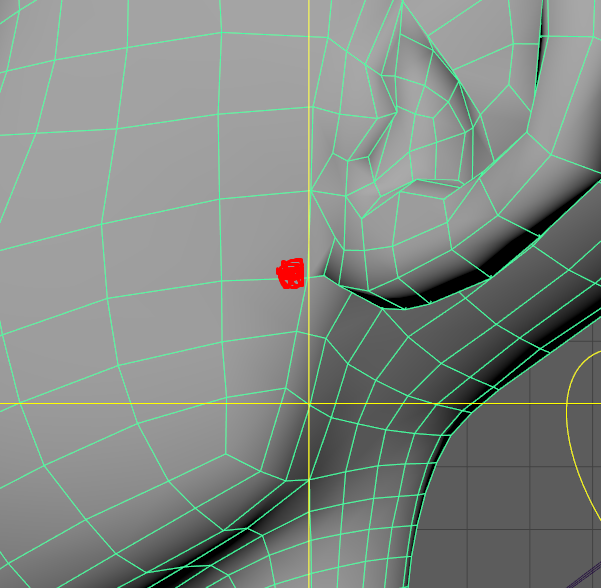
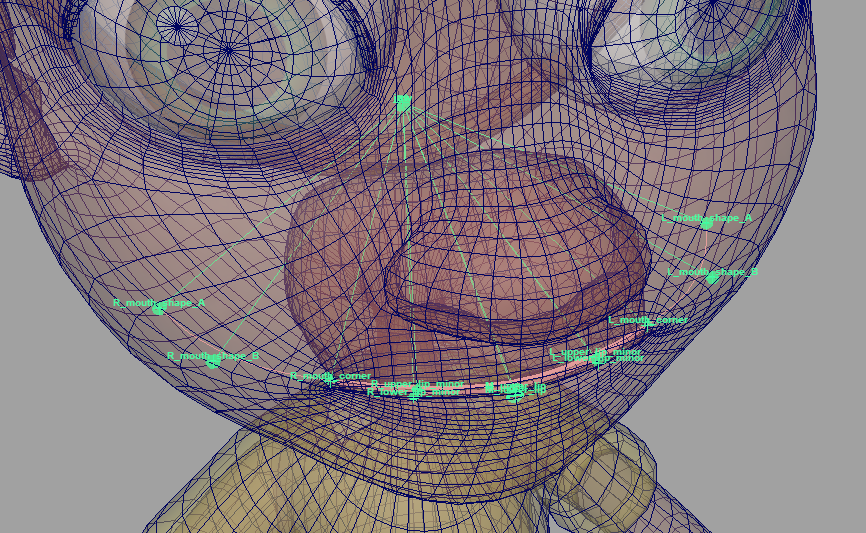
  • ‘Jaw’ – Jaw pivot position, usually positioned in the middle of the head on the X axis and slightly in front of and below the ears on the Y and Z axes.
  • ‘L/R_mouth_corner’ – Place at the lip corners and align with the lips.
  • ‘M_upper_lip’, ‘M_lower_lip’ – Position at the center of the upper lip or lower lip.
  • ‘L/R_upper_lip_minor’, ‘L/R_lower_lip_minor’ – Placed evenly between middle and corner guides on the lips.
  • ‘L/R_mouth_shape_A’, ‘L/R_mouth_shape_B’ – Place these guides past the lips and inside the cheek. A curve will be driven by them, and the corner ctrls will move along that curve.
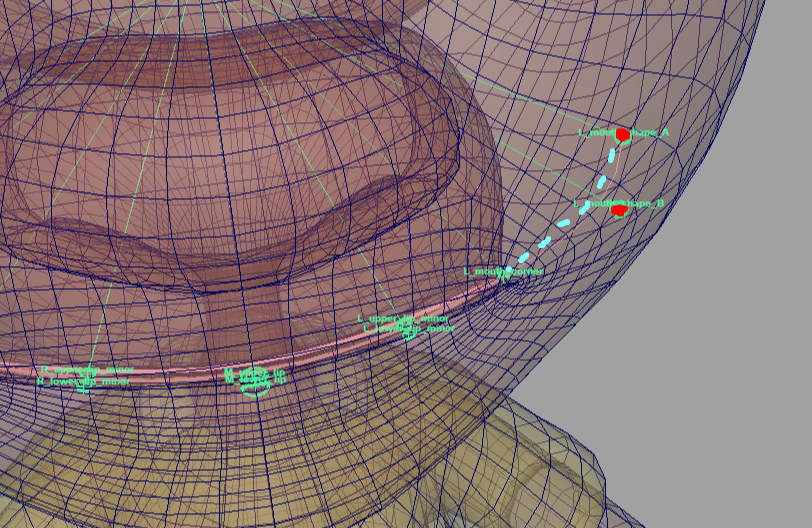
Guide’s Important Notes:

  • The ‘Mirror Mouth Guides’ button makes the right side guides mirror the left side.
    So with a symmetrical character, you only need to place the guides on the left side.
    Using this button in ‘Solo Mode’ will mirror the guides in world space.
  • Both upper and lower guides display two curves; the lips skinning joints will be created on those curves. Ensure the curves are on the edges of the lips that are closest to each other.
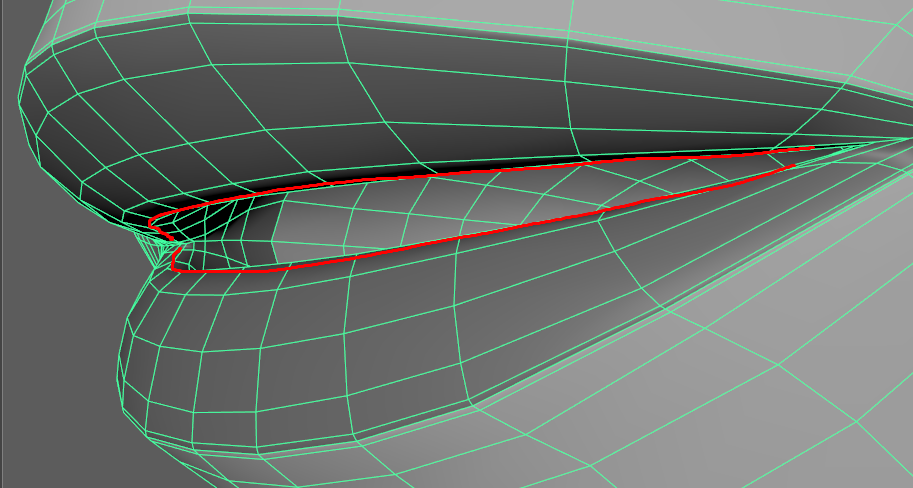
  • The guides also drive a thinner curve and this curve controls the movement of the corner ctrls.

Attributes:

  1. ‘Mirror Mouth Guides’ – This button positions the right side guides in a mirror image of the left side.
    In ‘Solo Mode’, they will be mirrored in world space.
  2. ‘Ctrls Scale’ – Scale all the node ctrls. Note that the attachments ‘Ctrls Settings’ and ‘CtrlsShape’ will override this. 
    [As of version 1.06.03]  ‘Update’ button to change the ctrls size without requiring a rebuild. [Video] 
  3. ‘Ctrls Offset Position’ – Offset of lips ctrls for when the ctrls are hidden inside the lips mesh.
  4. ‘Jaw Ctrl Offset’ – Offsets the jaw ctrl relative to its pivot. Use this attribute to position the ‘jaw_ctrl’ under the chin.
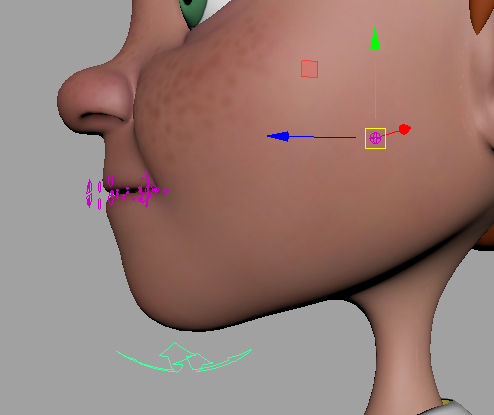
  5. ‘Lips Skinning Joints’ – The number of skinning joints per lip, not including corner joints.
  6. ‘Lips Bias’ – Use this to control how much the lips move with ‘M_upper/lower_lip_ctrl’.
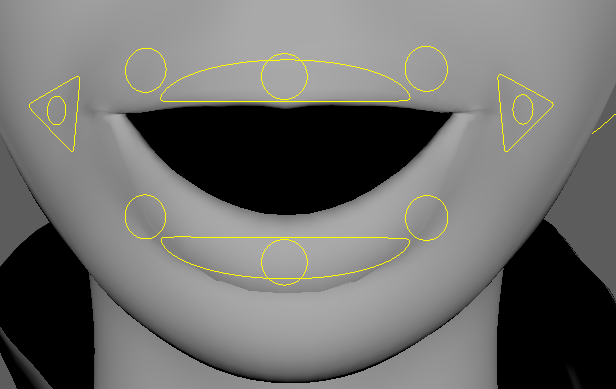
    value of 1.5
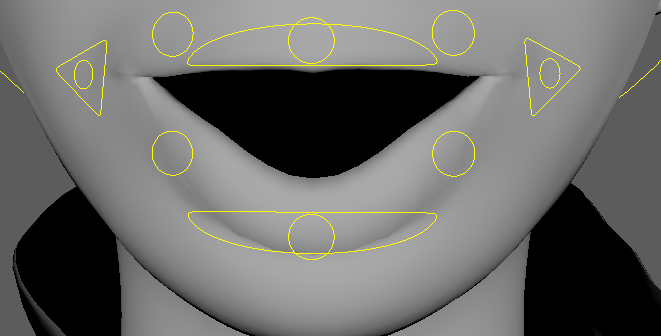
    value of 1.0
  7. ‘Create Roll’ – All minor and mid controls will have the ‘Roll’ and ‘Roll loc Vis’ attributes, which allow them to be rotated from a different position. The ‘Roll Loc Vis’ attribute will display a locator that controls from where the roll rotates.
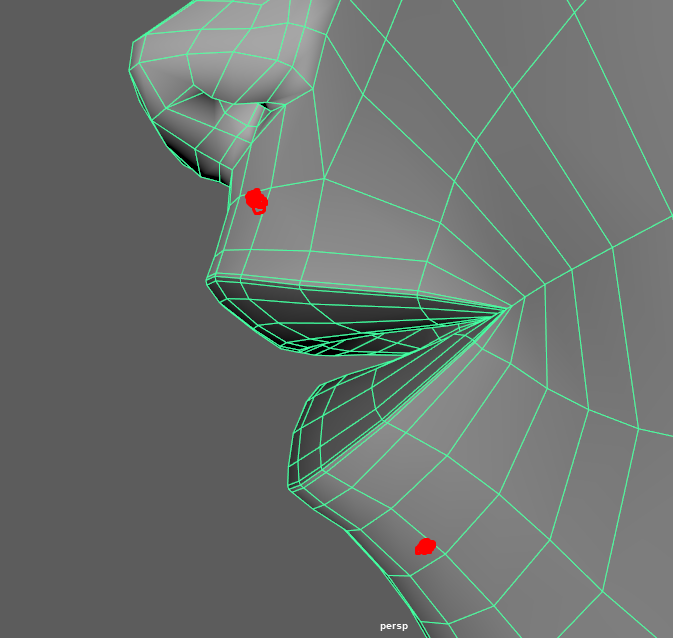
    (roll offset positions) 
  8. ‘Upper Roll Offset’, ‘Lower Roll Offset’ – The initial roll offset position from the ctrls. In other words, translation values of the roll locators.
  9. ‘Upper Lip Push’ – The lower lip will push the upper lip when they collide. Has an on/off attribute on ‘M_upper_lip_ctrl’.
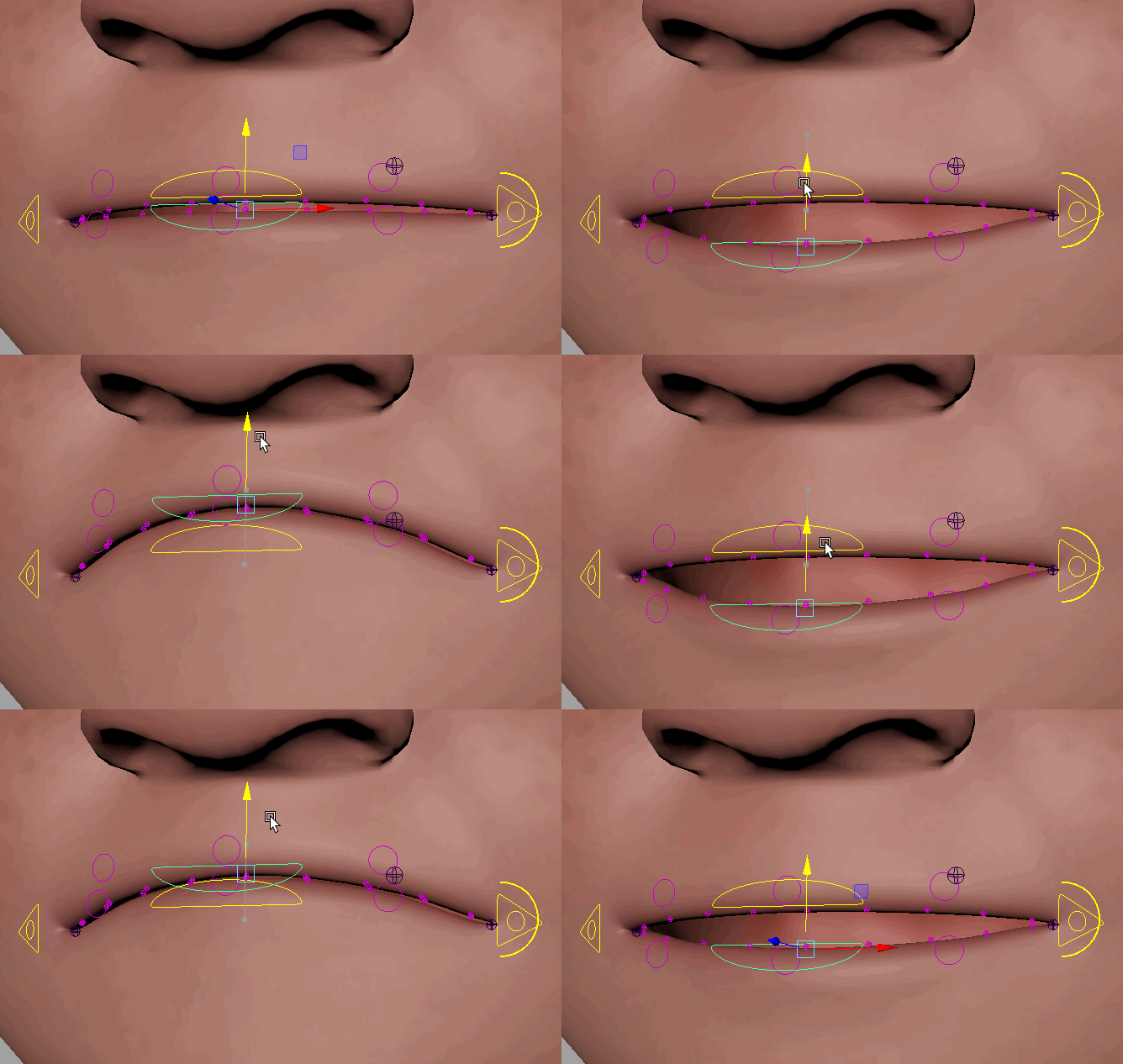
  10. ‘Micro Ctrls’ – Add a ctrl for every lip skinning joint.

Connections:

  • ‘Root Input’ – Drives the whole node, usually driven by the head.
  • ‘Head Output’ – An output at the ‘Root Input’ usually drives the upper teeth.
  • ‘Jaw Output’ – An output at the jaw joint usually drives the lower teeth.

_____________________________________________
Get Arise at: https://www.ariserigging.com

Updated on May 13, 2026

What are your Feelings

Share This Article :

  • Facebook
  • X
  • LinkedIn
  • Pinterest
CA FingersCA Eye
  • Home
  • Pricing
  • Support
  • My account
  • Privacy Policy
  • EULA

Copyright © 2026 - Arise Rigging System

This website uses cookies to ensure you get the best experience. By using this site, you agree to our use of cookies.
Accept
Manage consent

Privacy Overview

This website uses cookies to improve your experience while you navigate through the website. Out of these, the cookies that are categorized as necessary are stored on your browser as they are essential for the working of basic functionalities of the website. We also use third-party cookies that help us analyze and understand how you use this website. These cookies will be stored in your browser only with your consent. You also have the option to opt-out of these cookies. But opting out of some of these cookies may affect your browsing experience.
Necessary
Always Enabled
Necessary cookies are absolutely essential for the website to function properly. These cookies ensure basic functionalities and security features of the website, anonymously.
CookieDurationDescription
cookielawinfo-checkbox-analytics11 monthsThis cookie is set by GDPR Cookie Consent plugin. The cookie is used to store the user consent for the cookies in the category "Analytics".
cookielawinfo-checkbox-functional11 monthsThe cookie is set by GDPR cookie consent to record the user consent for the cookies in the category "Functional".
cookielawinfo-checkbox-necessary11 monthsThis cookie is set by GDPR Cookie Consent plugin. The cookies is used to store the user consent for the cookies in the category "Necessary".
cookielawinfo-checkbox-others11 monthsThis cookie is set by GDPR Cookie Consent plugin. The cookie is used to store the user consent for the cookies in the category "Other.
cookielawinfo-checkbox-performance11 monthsThis cookie is set by GDPR Cookie Consent plugin. The cookie is used to store the user consent for the cookies in the category "Performance".
viewed_cookie_policy11 monthsThe cookie is set by the GDPR Cookie Consent plugin and is used to store whether or not user has consented to the use of cookies. It does not store any personal data.
Functional
Functional cookies help to perform certain functionalities like sharing the content of the website on social media platforms, collect feedbacks, and other third-party features.
Performance
Performance cookies are used to understand and analyze the key performance indexes of the website which helps in delivering a better user experience for the visitors.
Analytics
Analytical cookies are used to understand how visitors interact with the website. These cookies help provide information on metrics the number of visitors, bounce rate, traffic source, etc.
Advertisement
Advertisement cookies are used to provide visitors with relevant ads and marketing campaigns. These cookies track visitors across websites and collect information to provide customized ads.
Others
Other uncategorized cookies are those that are being analyzed and have not been classified into a category as yet.
SAVE & ACCEPT